Home · The Ordane Journal · Risk and Exposure · Prop Firm Platform Outage: Preserve Your Proof
Prop Firm Platform Outage: Preserve Your Proof
A prop firm platform outage is a period when the trading interface, its connection to the trading service, or the price feed is unavailable or materially unresponsive to the user. The first job is not to assign blame. It is to preserve what happened before the visible state and server records change.
Ordane accounts operate on simulated capital. No live funds are traded and no deposits are accepted. (Ordane Rulebook v1.0, clause P-2 and site disclosure, retrieved August 3, 2026)
If a prop firm server goes down during a trade, stop adding instructions, capture the full screen and exact time, save order identifiers and account history, then report one chronological incident. A screenshot can show what you saw. It cannot, by itself, prove which layer failed or what remedy the contract requires. If you are still deciding which firm to trust with that record in the first place, the checklist in are prop firms legit covers the reserve, rulebook and shutdown questions that matter before an outage ever happens.
What is a prop firm platform outage?
A useful outage definition names the symptom without pretending to know the cause: the trader could not reliably view, submit, modify or cancel an instruction through the expected platform during a defined time window. That definition keeps the first report factual. It does not turn a frozen chart into proof that the firm, the platform vendor or the trader's internet connection caused the event.
A quotable one-sentence definition
Platform, feed, device and internet failures are different
Treat an outage as an incident with several possible layers. Do not choose a culprit first and make the evidence fit later.
| Observed condition | What it may be consistent with | What the observation does not establish |
|---|---|---|
| The whole interface will not load | A platform service interruption, account authentication problem, browser issue or local network failure | Which system caused it |
| The interface loads but one symbol stops updating | A symbol session, market-data or instrument-specific issue | That every trader saw the same price state |
| Prices move but an order control does not respond | A user-interface, order-routing, permission or connection issue | That the order reached the server |
| One device fails while another view works | A device, app version, cache or connection difference | That the working view can safely submit an order |
| A connection warning or high-ping indicator appears | A degraded or lost connection observed by the client | Whether degradation occurred locally or beyond the device |
Match-Trader documents a web connection-lost banner, connection event notifications and a ping-based connection-quality indicator. (Match-Trade Technologies release notes, retrieved August 3, 2026) Those signals are valuable because they describe the client state at a particular moment. They are not a liability decision. A red connection indicator beside a frozen position is stronger than a cropped profit-and-loss image, but it still leaves the location and cause of the interruption open.
Use neutral language in the first report: "The close control remained pending from the first timestamp to the second timestamp" is reviewable. "The firm froze my account to make me lose" assumes motive and mechanism that the screenshot cannot show.
What should you capture immediately?
Capture the state before restarting the app, clearing a cache, switching networks or editing an image. The goal is a small evidence bundle that identifies the account, action, instrument, time and visible connection state.
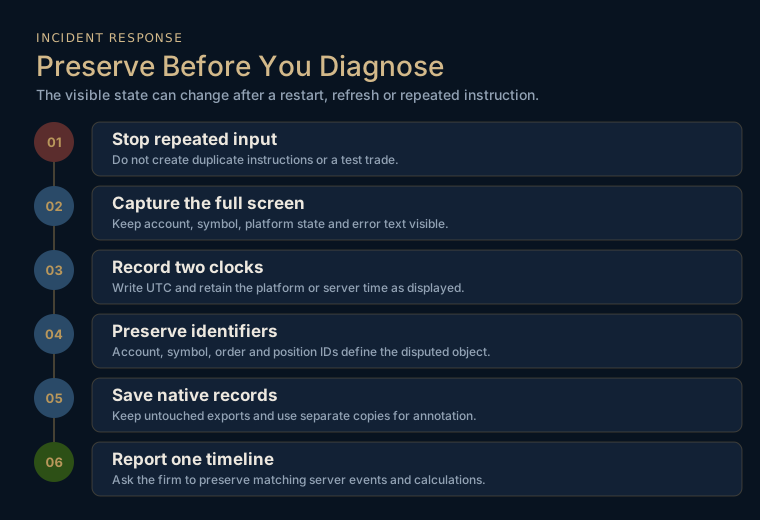
Timestamp, symbol, order IDs, connection state and screenshots
Start with the full screen. Include the device clock if it is visible, platform or server time, account identifier, symbol, position or order identifier, requested action, displayed price, connection indicator and any error message. Do not crop the first copy. A crop can be made later for readability while the original remains intact.
Then write a plain incident note while the sequence is fresh:
- Record the earliest time at which behavior changed, using UTC and the platform time if both are available.
- Record the account, symbol and every visible order or position identifier.
- State the action attempted, such as close, modify or cancel, without claiming it reached the server.
- Record the visible result, including spinner, disabled control, error text, stale price or connection warning.
- Record the first time normal behavior returned.
- Save any support notice, status notice or in-platform message visible during the same window.
The CFTC advises developing a timeline while events are fresh and collecting website screenshots, emails with full headers, account information, statements and trade confirmations. (CFTC evidence guidance, retrieved August 3, 2026) That guidance addresses reporting fraud, not a finding that an outage occurred. Its evidence pattern is still useful here: preserve records that a reviewer can date, identify and compare.
If the issue affects an open position, resist the urge to generate more evidence by repeatedly clicking. Duplicate close commands, repeated modifications or a new test order can create a second problem and blur the sequence. Capture once, use the firm's emergency or support channel, and follow only a documented instruction that applies to the account.
Preserve native logs and avoid altering evidence
Save exports in their native format when the platform offers them. Keep the original account statement, trade history, email and screenshot files. Put working copies in a separate folder. Record when each file was obtained and from which screen or message.
NIST says digital evidence creates preservation problems beyond those of traditional evidence and treats acquisition separately from preservation except where the two overlap. (NISTIR 8387, retrieved August 3, 2026) NIST guidance also warns that copying a file can change its creation time to the time of the copy. (NIST SP 800-86, retrieved August 3, 2026) You do not need a forensic laboratory for a support dispute. You do need to stop treating a renamed, edited screenshot as though it were the untouched original.
| Folder | Contents | Handling rule |
|---|---|---|
| originals | Full screenshots, recordings, exported history, emails and downloaded statements | Do not annotate or overwrite |
| working | Crops, highlights and a readable PDF assembled from copies | Every item points back to an original filename |
| timeline | One text or spreadsheet file ordered in UTC | Separate observed fact from inference |
| rules | The terms, rulebook and policy version in force for the account | Save the complete document and retrieval date |
| support | Ticket submission, automated receipt and every reply | Preserve headers, ticket number and timestamps |
How do you test whether the failure was local?
Use a diagnostic sequence that observes state without creating new market instructions. The purpose is to narrow possibilities, not to prove innocence through more trading.
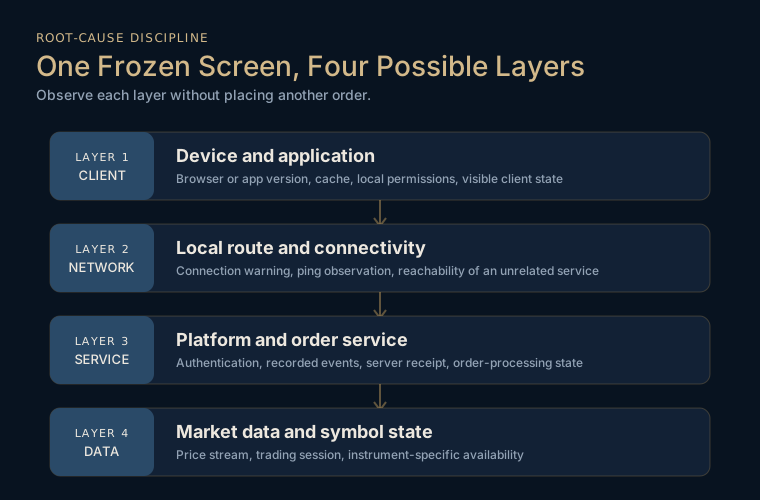
A safe diagnostic sequence
First, capture the failed state. Only then check whether another ordinary website loads on the same connection. Record the result and time. A working unrelated website shows that the device had some network access, but it does not prove the route to the trading service was healthy.
Second, record the platform's own connection indicator, ping display or error message. If the platform offers a browser view and an app view, a read-only comparison may help, provided logging in elsewhere does not violate an account rule, terminate the first session or change the evidence. Do not submit a test order.
Third, check the platform vendor's or firm's official status notice and support channel. Save the page even when it reports normal operation. A public status page does not settle an account-specific, regional or brief incident.
Fourth, ask whether the issue is limited to one symbol, one control or the whole account. Capture a symbol list or account panel without changing orders. If other prices update but the disputed symbol does not, say exactly that. Do not upgrade the observation into "bad feed" until server records support it. This is a distinct question from whether a static or trailing drawdown floor moved during the incident, a mechanic explained in static vs trailing drawdown.
Fifth, preserve the state and wait for documented instructions. If the rules publish an emergency dealing method, follow it exactly. If they do not, ask support to state the approved next action in writing.
Why one screenshot cannot establish the source
A screenshot records pixels on one client at one moment. It may establish the displayed account, price, warning and time. It generally cannot show whether a close request reached the server, how the server processed it, what price stream the server received, or whether another device had the same route.
Layer the evidence: client capture, order or position identifiers, device and connection context, native account records, a server-log preservation request, and the governing contract.
Match-Trader manager documentation says platform logs can include event time, trading account, IP address, device type, application type, recent ping, instrument, volume and open or close price. (Match-Trader Manager documentation, retrieved August 3, 2026) Those fields can test parts of the trader's timeline. They can show whether the platform recorded an event associated with an account and device. They do not make every silence conclusive, because a missing event could have several explanations and only the system operator can interpret the logging path.
Match-Trader manager documentation says its platform logs are stored for three months and older entries are removed automatically. (Match-Trader Manager documentation, retrieved August 3, 2026) That published retention window is a reason to ask for preservation promptly. It is not permission to wait until the end of the window, and it does not state how long every firm keeps every other record.
Which records make a dispute reviewable?
A reviewable dispute lets another person reconstruct the sequence without guessing which screenshot belongs to which order. Build one package, one timeline and one requested outcome.
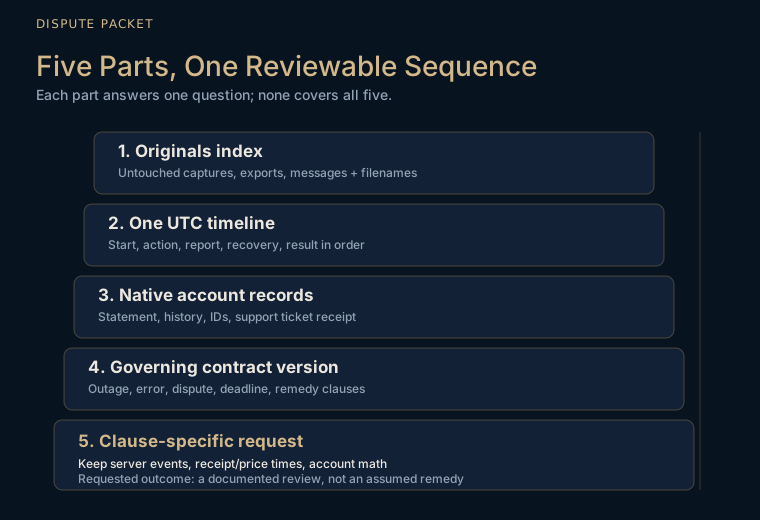
Record, what it proves and what it cannot prove
| Record | What it can establish | What it cannot establish alone |
|---|---|---|
| Full-screen screenshot | Visible account, symbol, client time, platform time, price, message and connection state | Server receipt, cause or contractual remedy |
| Screen recording | Duration and repeated visible behavior on one client | Whether the server or price provider failed |
| Account statement or history | Orders and trades the account record contains after the incident | Every attempted action that never reached the record |
| Order or position identifier | The exact object the dispute concerns | Whether an unrecorded click was transmitted |
| Email or support ticket receipt | What was reported, when, and under which ticket | The truth of every allegation in the report |
| Status notice | What the publisher acknowledged for the stated scope and period | Every regional, account-specific or short interruption |
| Local connectivity check | Whether another destination was reachable from the device | Health of the entire route to the trading service |
| Server or platform log extract | Events and fields actually recorded by the system | Events outside the log's coverage or retention |
| Rulebook or terms version | The language governing the account | Whether the facts satisfy that language |
Build one UTC incident timeline
Normalize the timeline to UTC, then retain the original displayed time beside it. Never convert and discard. Write one row per observation or communication.
| UTC time | Displayed time and zone | Source | Observation | Classification |
|---|---|---|---|---|
| Incident start | Platform or device time as shown | Original screenshot filename | Price stopped updating and connection warning appeared | Observed |
| First action | Platform or device time as shown | Recording and position identifier | Close control selected; pending state remained visible | Observed |
| Local check | Device time | Connectivity note | Independent site loaded on the same connection | Observed, limited |
| Report sent | Email header or ticket receipt | Support filename | Ticket submitted with account and order identifiers | Observed |
| Service returned | Platform time | Screenshot or recording | Prices updated and control became responsive | Observed |
| Account result | Statement generation time | Native export | Final recorded close or breach status | Observed |
Keep interpretation in a separate column or section. "The client showed a connection warning" is observed. "The firm's server failed" is an inference until the server-side record or acknowledgement supports it.
For eligible reparations matters, the CFTC asks for a detailed statement and supporting documents such as account-opening forms, account statements and trading records. (CFTC reparations eligibility guidance, retrieved August 3, 2026) The CFTC also says the complainant must collect and submit supporting evidence and the damages calculation. (CFTC proceeding guidance, retrieved August 3, 2026) These are evidence-design examples, not a statement that a particular prop-firm dispute is eligible.
How do you compare the outage with the written rules?
Evidence answers what happened. The contract answers what consequence follows. Search the version that governed the account, not only the current sales page.
Find outage, force-majeure and dispute language
Save the complete governing documents before quoting them. Record the document title, version, effective date and retrieval date. Search for these terms and close variants: availability, interruption, outage, price feed, data error, execution error, manifest error, off-market price, force majeure, dispute, adjustment, correction, cancellation, notice, deadline, evidence, logs, final decision and appeal.
For every relevant clause, extract five things:
- Scope: which event the clause actually covers.
- Duty: what the trader must do, including evidence and notice deadline.
- Discretion: who decides and against what stated standard.
- Remedy: correction, recalculation, cancellation, credit, replacement, review only or no stated remedy.
- Exclusion: the facts that take the event outside the clause.
Do not turn "may review" into "will reverse." Do not turn a force-majeure exclusion into a finding that every platform failure is excluded. Do not assume that an outage policy applies to a price-feed dispute, or that an execution-error clause covers a device problem. Match the incident to the nouns and conditions the clause actually uses. The same discipline applies to any other clause that reads narrower than the marketing around it, including how a consistency rule actually gets calculated at withdrawal time.
If no outage or dispute clause can be found, say that plainly in the ticket: "I could not locate a clause governing platform interruption or a deadline for reporting it in the version supplied with this account. Please identify the governing clause and version." Absence is not automatic victory. It is a precise request for the rule behind the outcome.
Ask for the exact clause and account calculation
A useful dispute request is short enough to route and specific enough to audit:
Attach the timeline, originals index, relevant statement, rule version and requested outcome. Do not attach an unlabelled archive of hundreds of screenshots. If a calculation is disputed, show the exact starting balance or equity figure used by the firm, the recorded trades, the disputed event and the resulting threshold. Use the firm's own definitions.
Ask whether the server received the instruction, which timestamp and price source were used, whether the account status changed automatically or manually, which clause and version governed, when the notice deadline began, and what remedy that clause authorizes.
Avoid demanding "compensation" before locating a compensation rule. A prop firm outage compensation rule is contract-specific. A technical interruption does not create a universal automatic reversal, account restoration or cash payment. It is also a separate question from how long a normal, undisputed request takes to reach your account, which the payout-clock breakdown in how long do prop firms take to pay walks through.
CFTC reparations eligibility depends on factors that include CFTC registration and an alleged violation of the Commodity Exchange Act or CFTC rules, so the program does not automatically cover a prop-firm platform dispute. (CFTC reparations eligibility guidance, retrieved August 3, 2026) Jurisdiction, registration, contract and forum matter. This article does not tell you where to file a legal claim. It gives you a record that a firm, lawyer, arbitrator or eligible authority can assess without reconstructing the incident from memory.
What does Ordane disclose today?
Ordane sells one product, the Ordane Instant Account: direct access, no evaluation phase and no challenge, on simulated capital.
Ordane runs on its own platform, built in-house rather than licensed from a third party. (Ordane account specification, retrieved August 17, 2026) That is the platform fact this article can state from the canonical record.
No canonical Ordane fact supplied to this article states an outage compensation formula, an automatic breach reversal, a special dispute deadline or a published emergency dealing method. This article therefore does not invent one. The evidence workflow above is general incident discipline, not an Ordane remedy.
If an incident occurs on an Ordane account, the sound request is the same clause-first request used throughout this guide: preserve the relevant platform and order records, identify the account and UTC window, ask which written clause governs the outcome, and ask for the calculation applied to the simulated account. The response must come from the governing record, not from a promise added by a blog post.
Before paying any firm, the stronger move is to check whether outage, execution-error and dispute terms exist while there is no open position and no deadline running. The broader prop firm audit checklist shows how to save the governing documents and identify clauses that leave a material decision open. That same due-diligence pass should also confirm whether the account model itself, instant account or evaluation, changes which clauses even apply to your account.
Frequently asked questions
What should I do if a prop firm platform goes down during a trade?
Stop sending repeated instructions. Capture the full screen, account, symbol, order or position identifiers, platform time, UTC time, connection state and error text. Save native account history and the governing rule version, report the incident through the documented channel, and ask the firm to preserve the server-side records for the same UTC window.
Does a screenshot prove a prop firm platform outage?
A screenshot proves what one client displayed at one moment, provided the file is authentic and the screen identifies the relevant account and time. It does not alone prove where the failure occurred, whether an instruction reached the server or what remedy the contract requires. Pair it with a timeline, identifiers, native records, connection observations and a request for server logs.
Should I place a test order when the prop firm platform freezes?
No. A test order creates new exposure, a new instruction and a second sequence for the reviewer to separate. Use read-only observations, preserve the existing state, and follow only a documented emergency method or a written instruction from support that applies to the account.
How do I save logs after a prop firm platform error?
Export native history or statements if the platform exposes them, save the untouched files in an originals folder, and work from copies. Record the export time and screen. In the support ticket, ask the firm to preserve platform, connection and order events for the exact account identifiers and UTC window, because the trader may not have access to server-side logs.
Can a platform outage reverse a prop firm breach automatically?
Not automatically. The result depends on the governing clause, the evidence and the firm's review process. Ask for the exact clause, document version, server event record and account calculation. Do not assume that a visible interruption creates an automatic reversal, replacement account or payment.
What evidence proves a trading platform outage?
No single item proves every layer. The strongest packet combines full-screen captures, a UTC timeline, account and order identifiers, native statements, connection observations, support records, any official incident notice, and server-side event data obtained from the firm. Each record should state what it shows and what it cannot show.
What is a prop firm outage compensation rule?
It is the contract language that states whether a defined interruption can lead to a correction, recalculation, cancellation, replacement, credit or another remedy. Read its scope, notice deadline, evidence requirement, exclusions and decision standard. If the contract states no compensation rule, do not infer one from a general support promise.
Sources
- Ordane Rulebook v1.0, on all accounts operating on simulated capital, with no live funds traded and no deposits accepted. ordanemarkets.com/rulebook Retrieved 2026-08-03.
- Ordane account specification, homepage, on the trading platform being Ordane's own, built in-house. ordanemarkets.com Retrieved 2026-08-17.
- Match-Trade Technologies, "Release notes: Match-Trader", on the web connection-lost banner, the connection event notifications and the ping-based connection-quality indicator. docs.match-trade.com Retrieved 2026-08-03.
- Match-Trader Manager application documentation, on the log columns available, including date, trading account, IP address, device type, app type, recent ping, instrument, volume and open or close price, and on platform logs being stored for three months with older entries removed automatically. docs.match-trade.com Retrieved 2026-08-03.
- NIST, "Digital Evidence Preservation: Considerations for Evidence Handlers", on the preservation of digital evidence presenting problems beyond traditional evidence preservation. nist.gov Retrieved 2026-08-03.
- NIST SP 800-86, "Guide to Integrating Forensic Techniques into Incident Response", on a copied file taking the creation time of the copy. tsapps.nist.gov Retrieved 2026-08-03.
- CFTC, "6 Steps to Take after Discovering Fraud", on developing a timeline while events are fresh and collecting the documents and information that support a later report or investigation. cftc.gov Retrieved 2026-08-03.
- CFTC, "Determine if Your Case is Eligible for the Reparations Program", on providing supporting documents such as account opening forms, account statements and trading records, and on eligibility depending on factors including CFTC registration at the time of the alleged wrongdoing. cftc.gov Retrieved 2026-08-03.
- CFTC, "Select the Right Proceeding for Your Issue", on the complainant having to collect and submit the evidence supporting the claim along with the calculation of damages. cftc.gov Retrieved 2026-08-03.
Disclaimer
Ordane accounts operate on simulated capital. No live funds are traded and no deposits are accepted. Payouts depend on simulated performance under Rulebook v1.0; no level of performance is typical or assured.
This article is for information only and is not investment, financial, or tax advice.